Tools
- Feb 16 2013 - iTerm2 vs Terminal.app (iTerm2 FTW!) ... I just switched from the built-in Terminal.app on Mac OS X (which I've always liked) to iTerm2. Here's some of what I like about iTerm2 :
- borderless windows
- better scrolling and mouse support (or better defaults?) I can use my scrollwheel in vim by default and clicking on a word moves the cursor which is a nice bonus (behaves like unix)
- feels faster; I was having issues with Terminal which seemed to be related to using Microsoft's Consolas font coupled with transparency and blur which was causing ever so slight but hugely annoying key lag in vim. (key lag in vim? really?)
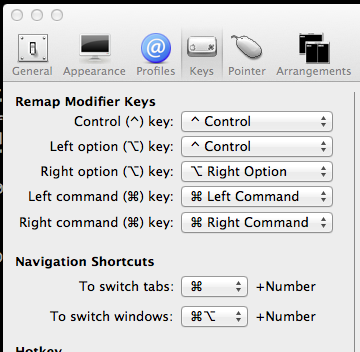
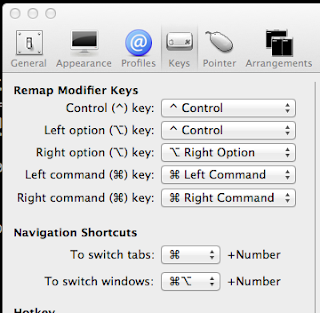
- remap the modifier keys!!! This was actually the reason I started looking for an alternative because my mac's "option" key is where I expect my control key to be and it was a source of continual frustration in vim and elsewhere. I remapped Left option to be a control key and life got better.
Check out the features page for a full list of goodness offered over the default Terminal application shipping with Mac OS X 10.8 and below... bunch of features I have not even started using yet - Feb 14 2013 - How does vim keep sucking me in? ... I "grew up" on vim, which is to say my second professional programming job 15 years ago required me to spend vast quantities of time in a terminal to a Solaris machine on which I used vi exclusively to get work done. In those two years I got relatively proficient at navigation, search and replacing, using registers, and tweaking .vimrc with custom settings and macros. I did NOT get into folding, window management, syntax highlighting, or plugins. Things have changed a lot in vim-land.
 Watching a friend operate vim last week triggered weirdly intense pangs of jealousy and masochistic visions of how I too could suffer through horrible learning curves and bouts of frustration in order to eke out those extra few moments of productivity per day. How I too could spend hours meddling with plugins and hacks, custom scripts and a terminal to get features which every modern IDE user now takes for granted. I romantically pictured my hands rooted on the homekeys, flying through mountains of text like a boss, and the legions of adoring co-workers who would wonder at my elite skills. Totally will happen.
So for what feels like the Nth time, I re-approached my old friend vim. It was shocking how much of my muscle memory had been retained, but it was also shocking how much I miss features like "find usages", "refactor...[anything]" and quick project based shortcuts for getting around files. One of the plugins my friend was using was NERDTree, which provides a pretty nifty tree project/folder navigator as a window in vim. Almost but not quite a project view.
And when it comes to plugins, all the cool kids these days are using the social git-goodness of github combined with a neat plugin called Pathogen to create "dotVim" repositories which make the whole process of managing, sharing, and installing your perfect vim environment far far simpler. Branch a dotVim repo, symlink it into your user folder and you're off. You'll find a ton of documentation out there on how to make it work so I won't repeat it here. I based my latest attempt at vim heaven on Kody Krieger's dotVim, which is a slimmed down version of Janus which uses Pathogen. I particularly liked that installation of this is bootstrapped so you can run a single command in the console to get started: (which of course I had to inspect before running because I'm paranoid like that)
curl https://raw.github.com/codykrieger/dotvim/master/bootstrap.sh -o - | sh
Anyway, after dealing with some issues as a result of missing plugins (slim, which looks to be fixed since I installed) I was off and running. I ended up deleting the ruby specific plugins and adding a few color schemes but have otherwise only changed the .vimrc (macros, and tabs not spaces damnit! unless it's python, then spaces are ok)
NERDTree is great, but I find myself still relying on good ole :e for most things
Ctrl-P is fantastic but I find it doesn't always work, I'm guessing I need to feed more information about my context to it so that it searches the right paths. When it does work though it's basically :e on steroids.
Fugitive is amazing, and the ability to quickly pull up a diff on what you're working on is lovely. I still hit the command line more often than I probably need to.
There are a bunch of others in here that are probably making life nicer without me even knowing...still much to learn.
I quite like the git repo approach and the fact that I was able to tweak everything on my laptop and then just clone to my desktop at home was pretty fantastic. I will say though that I find the sub-modules a bit of a nuisance. I don't really need to be on the bleeding edge of vim plugins and I'd rather have full control so I removed all of the submodule aspects to the above dotVim and will just pull updates when I hit bugs or need new features. The end result of my efforts are on bitbucket.
To commit myself more to learning the editor I've also started using it for writing simple text documents as well like the government forms I'm in the process of filling out. It's fun to make a terrible job an opportunity to refine your tool skills. Vim out of the box is not great at handling paragraphs of text however and so a few tweaks are required. I have the following in my .vimrc which allows me to quickly enter "prose" mode (fixing line up line down in wrap mode being the biggest element for me)
" setup the current vim instance for writing prose style
command! Prose call SetupForProse()
function SetupForProse()
"break lines visually, and don't group hardbreaks on previous word
set formatoptions=1
set linebreak
set wrap
set nolist
"set breakat=\ |@-+;:,./?^|
"change default cursor keys to work on visual not actual lines
nnoremap j gj
nnoremap k gk
vnoremap j gj
vnoremap k gk
"border on the left hand side
set foldcolumn=7
endfunction
On with the self torture! - Oct 27 2011 - From GitHub to BitBucket in 60 seconds ... Three weeks ago I finally decided to pay for GitHub so that I could keep some of my new projects private without giving up the beauty that is their cloud based source control. Last night I decided to try BitBucket's new FREE offering and see whether I could save myself $7/month. Literally fifteen minutes later I was deleting my private repo's on GitHub so that I could downgrade my account back to free.
I am of two minds on this, because on the one hand I want to see GitHub succeed. They are the innovators as far as I'm concerned and I've been extremely happy using their service. BitBucket feels like a cheap knock-off in almost every way, which is great because it's familiar and easy, but I almost don't want to use it on principle. On the other hand, I would rather clearly rather pay nothing then $84 a year for my personal projects which I want private. Should any of these projects take off I will need to pay when the number of users goes past 5, which makes sense. Until then these projects don't have any monetary value anyway and so are not worth spending money on just for privacy.
Anyway enough opinion.... here was the process :- Create a user on bitbucket.org. Love that they have OAuth support - but you do still need to pick a username and password for use from the git client.
- I was able to select the same username I had on GitHub which simplified moving things a bit
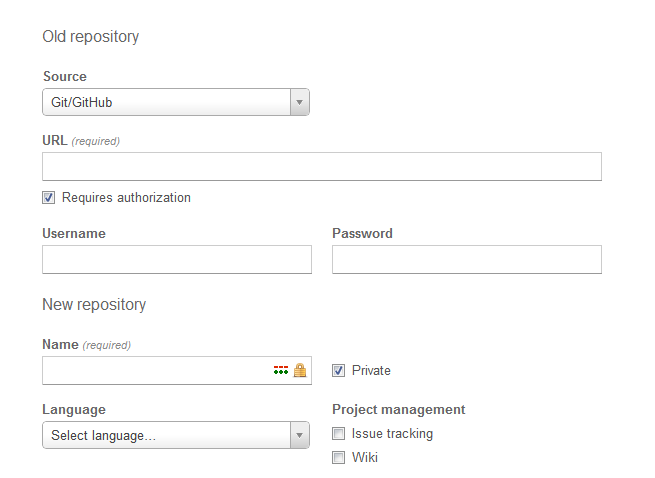
- Under the repository menu select "Import Repository", then select github, provide your credentials and click go
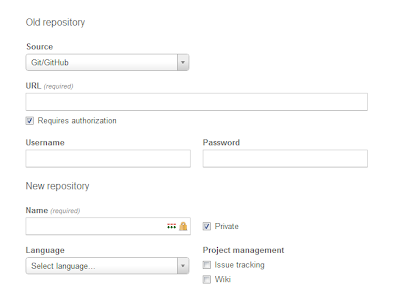
- Magic! you have your repo moved along with all of your commits and history. Very simple.
- Go here and add your ssl key which you should already have from using GitHub (~/.ssl/id_rsa.pub)
- Now for each repository you moved, on each machine you use, edit the following file:
/repo_location/.git/config
If you've kept the same username then the only change to make is the domain: (obviously change the username if you need to ;-) )
OLD: url = git@github.com:your_user_name/your_project.git
NEW : url = git@bitbucket.org:your_user_name/your_project.git - Done. Commit, push and pull as before. Your project is happily oblivious.
So far the experience has been good. No mac client for bitbucket but I was having problems with the mac GUI client anyway and always ended up on the command line. The UI is familiar and because I hadn't really gotten into the social features and other aspects of github I have noticed no real difference in service.I wonder how long before GitHub changes their model slightly to compete with this.... - May 27 2011 - Timeline tools ... My memory is awful, it really is. I maintain a private personal blog which I use for capturing extremely short pieces of content that I want tagged and timestamped. Works well for those random thoughts that are maybe not suitable for sharing but which I want to capture nonetheless. Anyway, I'm looking for sometime similar to aid my memory at work and have been considering something more along the lines of a timeline of sorts where I can jot down major company moments, hires etc in a format that's easy to explore and I came across the following online timeline makers which all seem to fit the mold of what I need....http://www.timetoast.com
http://timerime.com
http://www.preceden.com/
http://www.allofme.com/
http://www.xtimeline.com
Once I actually decide which one to go with I'll report back. Data portability will be important for me as I'll need to invest quite a bit of time into putting it together and would hate to lose it into the cloud. Easy of entry is probably second highest and visuals are third.
Also check out http://moreofit.com, great tool for finding competing tools/solutions once you have found one you like. - Sep 2 2009 - hanselman tools 2009!! ...
Saw this on reddit tonight, hanselman has updates his legendary tools list for 2009. So what was going to be an evening of actual coding is slowing turning into an evening of trying out cool new tools that have made his list. (I’m writing this blog post in windows Live Writer after seeing it in the list)
- May 11 2009 - taking a step back/up/sideways (thebrain) ...
Around 2003, 2004 I had a bit of a mild obsession with organizing my life into digital form, creating as many mappings as I could from my everyday existence into some kind of digital form. This of course included ideas and thoughts, writings and paintings, music and movies, friends and bits of information about those friends etc. This amass of data have gone from one disjointed medium to another (.txt files in folders, emails, blog posts, napkins) without ever really achieving any chohesiveness or real improvement in my ability to actually synthesize or act on all that information.
At that time the closest tool I found that could come close to mapping ideas and thoughts in a way that made sense to me was “TheBrain” a piece of software intended for visualizing information, and as importantly, the links between that information. As a user, you add “thoughts” to your brain which become nodes in a large graph of ideas, thoughts, attributes, urls etc. You can then very quickly build child, parent and sibling links between those nodes to add more context and information. Those links can then be categorized to add even more context to the relationship between ideas which is often very important information. Unlike a lot of “mind mapping” tools I’ve used though, the brain does not force you into a tree structure. Your thoughts can have multiple parents and siblings or “jumps” to thoughts anywhere else in your brain, whether they are directly related or not. Hyperlinks, imagine that! I think for the actual exercise of brainstorming and free flow thought this is critical. It also mimicks how I visualize my own thoughts working. I’ve since tried personal wiki’s which give you a lot of the same flexibility but lack the very fast keyboard entry for connections and nodes and force you to think at the level “inside” the node, by editing the page. Whereas the brain allows you to think and work at the level of the topology, which is really effective.
I stopped using the software basically because of the overhead of attempting to keep the futile mapping exercise up to date. Imagine if every idea and thought you had needed to be compulsively cataloged manually into a program in order to keep the overall picture intact. It just doesn’t work, at least not for me, and not for long and detracts from my overall goals. I found that every time I opened my brain there was just too much catchup work to do in order to get things synced up and in order.
The other thing that changed for me since 2004 has been search. Between Google and Spotlight on my mac I basically stopped categorizing information in the same ways I used to have to. It becomes less and less necessary to build nested categories of programs or emails or documents etc. Search has exposed the entire hierarchy in a glance, in many cases keeping the context intact that would have derived the categories. Still there is value in the information of that structure, but in a far less visible way.
Well I’ve resurrected the brain and am using it in a new way that seems to be actually working for me. For starters I don’t keep any notes or real content in the brain, this is one of the clumsiest facets of the tool and almost seems like an afterthought. It really is all about the topology, which for me is fine since the bulk of what I need is often in dedicated stores (subversion, sharepoint, team foundation server) I’ve found any attempt to use the clumsy palettes and data entry forms to just be too cumbersome to bother with.
Focusing on the nodes and connections, and learning all the keyboard shortcuts have enabled me to use the brain in a way that is a lot like I sometimes use notepad when I need to brainstorm. Except rather than dashes, asterisks and plus-signs I’m using jumps, parents and children of small snippets of text. It’s really a cool feeling being able to navigate this very large graph of interrelated concerns and ideas with very little effort. Wiki’s and other hypertextual forms have served me well too, but never with so little impediment.
For high level thinking and free form brainstorming this tool is the best I’ve used. And provided I keep it to just the free flowing jumping and navigating it’s incredibly useful.