Macosx
- Feb 16 2013 - iTerm2 vs Terminal.app (iTerm2 FTW!) ... I just switched from the built-in Terminal.app on Mac OS X (which I've always liked) to iTerm2. Here's some of what I like about iTerm2 :
- borderless windows
- better scrolling and mouse support (or better defaults?) I can use my scrollwheel in vim by default and clicking on a word moves the cursor which is a nice bonus (behaves like unix)
- feels faster; I was having issues with Terminal which seemed to be related to using Microsoft's Consolas font coupled with transparency and blur which was causing ever so slight but hugely annoying key lag in vim. (key lag in vim? really?)
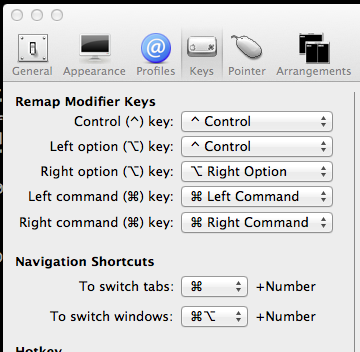
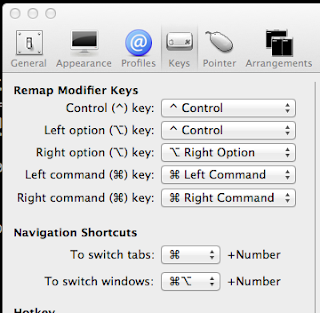
- remap the modifier keys!!! This was actually the reason I started looking for an alternative because my mac's "option" key is where I expect my control key to be and it was a source of continual frustration in vim and elsewhere. I remapped Left option to be a control key and life got better.
Check out the features page for a full list of goodness offered over the default Terminal application shipping with Mac OS X 10.8 and below... bunch of features I have not even started using yet - Dec 14 2009 - google chrome software updates make everything else feel broken ... I am growing more and more annoyed at the Apple's and the Adobe's of the world who are constantly interrupting my work to tell me that there are updates waiting for me to install. Why do I have to manage this? Yes I know that I can go in there and tweak the settings so that I don't get annoyed... but why should I even have to do that? I would need to do that across every user account on every machine I use on a regular basis! (5) This is noise, and it isn't at all necessary for me to have to think about it.
I believe this is part of the convenience of applications delivered in the cloud. (sorry to throw that term out there) It is part of the convenience that has me accepting fewer features in order to get that functionality.
There are companies out there who understand this, and are working hard to create a better user experience. Google for example went to great lengths in order to be able to update their entire browser in under 100 KB of download just to make the experience more efficient, user friendly and safer. Not only that but chrome updates happen automatically, again to help with security. It's very close to the experience I get by logging into gmail, which is always up to date. Now I can already hear rattles of complaint about "control" over your own machine, but I have to ignore this or I'll get completely derailed. I'll say in short that I think that control is an illusion, and the alternatives are worse.
If you have not already read this post by the chrome developers I highly recommend it.
http://blog.chromium.org/2009/07/smaller-is-faster-and-safer-too.html
And then you have the Apple, who has gone from a position of pushing hard to avoid needing to reset the operating system unless absolutely needed to requiring reboots for Quicktime, Safari and sometimes even iTunes (especially in windows). You can argue all you want that it's because of kernel extensions or who knows what else - but at the end of the day it doesn't matter why. This is bad design and leads to a diminished user experience.It seems like more and more often I am prompted with a software update dialog that looks like this one. Three out of four of the updates require a reboot! Are you serious? And chances are good that I will continue to ignore this dialog because closing all of my browser sessions, and ending the long running handbrake encode, and stopping the download I have going, and turning off the TV program I'm watching all amount to a whole lot of trouble for something I don't think I should even have to think about.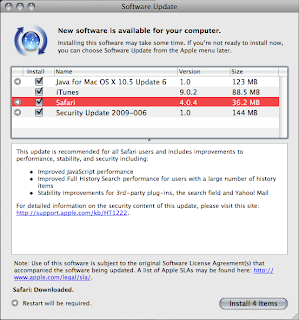
Seriously what is so special about Safari that they require me to download 36.2 MB and restart my machine for a point release?? Maybe this didn't seem so offensive before Chrome, but now it feels dated and clunky.
I really should pick on Adobe here for the horror that is the Adobe Updater, but honestly I really do expect more from Apple. Adobe is too easy of a target.
Please fix this Apple, you can do better. Where is the Steve Jobs who wanted to save lives by reducing boot times?? - Dec 31 2008 - 1 TB drive won't format using Disk Utility ...
I just bought a 1TB external HD, the “Maxtor OneTouch 4 Plus” this weekend on sale at London Drugs. A bit of an impulse purchase but I’ve been digiizing all of our dvd’s lately into iTunes and had completely run out of space…
The drive has a bunch of automated backup features I’ll never use, so I skipped all the software and went to use the drive directly from Mac OS X. First step here is to convert the format of the drive from it’s default of NTFS to something Mac can natively use. My impulse was to simply “format” and continue but unfortunately every time I tried the format disk utility would abort with nothing useful showing in the console logs. I went through this a few times with different file system settings and nothing worked. (See this ArsTechnica link for how to choose your filesystem)
Odd.
I then tried to partition the drive - and two partitions or more would all of a sudden work. Again odd, but I didn’t want more than one partition in this case, but reverting back to one partition would cause the same problem all over again. I resorted to Google at this point and came across this very useful although somewhat poorly formatted post on Seagate forums. (seems to be a generic problem with disk utility)
http://forums.seagate.com/stx/board/message?board.id=freeagent&thread.id=1062
The gist of the problem being that the default partition table format needs to be changed to GUID. You can apparently only acheive this by partitioning (in this case to two partitions) so you can change the setting for partition table format and then partitioning again back to one partition with the new partition table format intact. Annoying but easily worked around once you stumble on the right answer.
Note this issue is actually new to 10.5.* and you can also solve the problem by formatting from an older version of Mac OS X (from a boot CD for example). - Sep 6 2008 - frequent beachballs in mac os x caused by bad fonts ...
I’ve been testing the latest nightly builds of firefox 3.1 over the past few days and while generally impressed with the performance improvements in javascript was quite disapointed that it was causing my iMac to go into frequent hangs where I would see the spinning beachball of death for many seconds before I could continue working again. It became bad enough that I finally had to ditch my firefox testing efforts.
Much to my chagrin the problem continued well after I had stopped using good ole Minefield. I began to explore running processes via activity explorer and just generally clean up my machine. So after uninstalling a bunch of apps and services I wasn’t running anymore and still experiencing the same problem.
At this point I was worried because the cpu was not the issue, iTunes would continue to play with no problem (and even respond to the hotkeys on my keyboard for switching tracks) it was just the UI that was freezing, and generally as I was opening files. Disk issue? Memory? Maybe even something where the network was introducing some latency? After some googling and consternation over my potentially failing disk I finally did what I should have in the first place and started to dig into the system logs via Console.
Sure enough one group of messages stood out right away…06/09/08 9:21:29 PM com.apple.ATSServer[14462] ++++++++++++++++++++++++++++++++++++++++++++++++++++++++++++++++
06/09/08 9:21:29 PM com.apple.ATSServer[14462] 2008.09.06 21:21:29.63
06/09/08 9:21:29 PM com.apple.ATSServer[14462] ATSServer got a fatal error (status: -4) while processing a message (id: 20) from pid=14309.
06/09/08 9:21:29 PM com.apple.launchd[386] (com.apple.ATSServer) Throttling respawn: Will start in 10 seconds
06/09/08 9:21:39 PM com.apple.ATSServer[14465] ++++++++++++++++++++++++++++++++++++++++++++++++++++++++++++++++
06/09/08 9:21:39 PM com.apple.ATSServer[14465] 2008.09.06 21:21:39.90
06/09/08 9:21:39 PM com.apple.ATSServer[14465] ATSServer got a fatal error (status: -4) while processing a message (id: 20) from pid=14309.
06/09/08 9:21:39 PM com.apple.launchd[386] (com.apple.ATSServer) Throttling respawn: Will start in 10 seconds
06/09/08 9:21:41 PM quicklookd[14463] [QL ERROR] ‘Creating thumbnail’ timed out for ‘<QLThumbnailRequest /Library/Fonts/LiberationSans-Regular.ttf>’
06/09/08 9:21:50 PM Console[14309] Failure with ATSFontGetUnicodeCharacterCoverage(). Disabling font fallback optimization for characters not renderable.
06/09/08 9:21:51 PM com.apple.ATSServer[14468] ++++++++++++++++++++++++++++++++++++++++++++++++++++++++++++++++
So the ATSServer (Apple Type Server) was choking and it looks like the beachballs I was seeing were related to the throttling of the respawn of the server. So I’d be staring at a beachball for up to 10 seconds while the rest of the OS hummed along fine. A quick google search revealed the most common reason for this kind of failure is a corrupt font. At this point I shot around in my chair and asked my wife pleadingly and only somewhat accusatorily whether she had by any remote chance installed any fonts lately….. Yes. So I gave her control of my screen so she could clean up what had been added and like magic the beachballs ended. No reboot or anything required, ATSServer has not crashed since and I am writing this in Minefield 3.1b1pre with no problems! (sorry to blame you firefox)
Sadly I do not have the patience to go through the exercise of finding which fonts specifically caused the problems. I really don’t have much use for the extra fonts so I’m just as happy to have them all gone. Still hopefully this helps someone.
Now if I could just clean up all these damn mds errors that keep cropping up …mds[34]: (Error) Import: importer:0x84b600 Importer start failed for 501 (kr:268435459 (ipc/send) invalid destination port)