Blogquotes
- Aug 24 2010 - blogquotes version b02.1 ...
New release of blogquotes is out, with the biggest change being a switch from exclusive reliance on google accounts for login to leveraging a cool service at http://www.janrain.com/ that gives me a simple way of integrating authentication from a bunch of different sources. So you no longer need to be a google user to use blogquotes!
Note that if you were previously using google to login this should just work albeit with a slightly different UI. And if you find other methods to be more preferable they should also “just work” provided that you use the same email address for those services. Note the logout button at the top of the page which will tell you what email or ID you’ve logged in with. So for example if I login with facebook all my old quotes are there, but if I login with blogger which doesn’t use the same email address I get nothing and am essentially starting fresh.
- enhancement : support for Facebook, Google, Windows Live ID (includes hotmail), Blogger, Wordpress and LiveJournal logins (have yet to validate Wordpress + LiveJournal)
- bugfix : javascript remote inclusion could still barf on some unicode, added clientside utf-8 handling
In the background I’ve also made a number of restructuring changes to the code which should help me release changes faster.
Please leave comments on this post if you are having trouble getting access or for some reason can’t see the quotes you’ve already entered. (no data has been deleted!) - Aug 20 2010 - Unicode woes and Python unit testing in GAE ...
One of the really cool aspects of deploying to Google’s cloud offering (GAE) versus the more machine oriented Microsoft Azure and Amazon EC2 approaches are that you really are only dealing with computing resources. You deploy your app not to any particular server, but to the cloud itself. Despite the very real challenges in distributing work across data centers I am still filled with visions of automagical propagation and distribution and unlimited elastic computing. Beautiful. Anyway I was inspecting the logs and was SHOCKED to discover that there have been close to a thousand quotes added to system by 37 users. THIRTY SEVEN USERS!! Now, these are small numbers I know, but given the only publicity I’ve ever given this has been the two posts on this blog I was absolutely amazed to find that people had not only managed to find the app but were able to use it! (It’s quite ugly)
There is nothing quite as motivating as having users.
So I started looking at log files and discovered that I am actually throwing errors for at least some of those users who are not English speaking and are using Unicode characters. Oops. You’d think I’d know better by now. See : The Absolute Minimum Every Software Developer Absolutely, Positively Must Know About Unicode and Character Sets (No Excuses!)
In most cases for these bugs it just meant calls to unicode(var) rather than str(var) . So for example when parsing url variables starting with the example provided here by Google and adding my own processing of an array of arguments to a method like so…
def update_field(self, fieldName, *args):
strings = [str(arg) for arg in args]
….
return
and then calling that code with a unicode character such as ‘’–" would produce an error that looked like this…UnicodeEncodeError: ‘ascii’ codec can’t encode character u’\u2013’ in position 0: ordinal not in range(128)
the same code as above corrected is below. There were a few variants on this but this is a good example of a function where user defined input dictated a change to accommodate.def update_field(self, fieldName, *args):strings = [unicode(arg) for arg in args]….return
So in the course of digging in and finding/fixing these bugs I also recognized I was far overdue for some unit testing. So starting with the premise that I needed a way to reproduce the issue in the lab and write a failing test for this bug I went in search of the best method to do so. Python actually has [pretty good unit test support] built-in but I was also looking for something that would work in the context of GAE. It doesn’t take much looking before stumbling on GAEUnit, which is a useful extension that provides some scaffolding for tests that will run within GAE. The major negative to this is that your tests are part of your application, but I don’t have a problem with that as it’s easy to secure them to administrator access only but for some people it’s a block.
The next issue I ran into with this was the fact that the python SDK for GAE doesn’t include a method for testing content behind authentication. So whereas in Java you can say this :private final LocalServiceTestHelper helper =
new LocalServiceTestHelper(new LocalUserServiceTestConfig())
.setEnvIsAdmin(true).setEnvIsLoggedIn(true);public void testIsAdmin() {
UserService userService = UserServiceFactory.getUserService();
assertTrue(userService.isUserAdmin());
}
But today there is no equivalent for that in python. I wasted a few hours trying to work around this issue before deciding to just login before I run tests. My login lasts for hours so this isn’t much of a constraint. In the long run I plan to drop Google’s authentication any and move to janrain/rpx to allow users to login using whatever they like. That will mean abandoning or at least shimming the infrastructure provided by GAE, but has the additional benefit of reducing my applications direct dependency on Google. Once I have my own definition of Session and session provider I can of course mock it out and control it a lot easier.
Here’s the test, no asserts but if there is a problem we’ll see an exception
def test_unicode_to_json_error(self):
badQuote = q.Quote(quote=‘hi there ’ + u"\u2013")
result = badQuote.jsonSafe()
simplejson.dumps(result)
So one error-type in the log file later I’ve spent a couple days, done a bunch of refactoring and have produced no new functionality… but I do have this!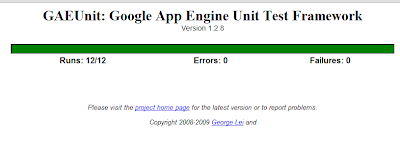
Of course then, after all that I STILL ran into an error with the JavaScript, for which I have yet to add unit testing for. Sigh. I’ll have to choose between qUnit which I’ve used before and YUI-test which is probably better aligned to the rest of my application.
The JavaScript portion of this bug was basically because I was calling unescape() on a url-encoded variable. URL encoding though only supports 8-bit characters and doesn’t truly allow unicode, so my unicode characters became three ascii characters which could include control characters or other undesired results. There seems to be a lot of people standardizing on UTF-8 within url-encoded variables but it’s purely a convention at this point. Thankfully I found this pre-written code on webtoolkit.info that knows how to do the look ahead at the next three characters in order to handle UTF-8 input properly.
Now I hope it’s safe to say that blogquotes can handle unicode! (and has some unit tests to boot!) - Aug 9 2010 - Blogquotes version b01.2 ...
Didn’t expect to get more released this weekend or I would have combined these posts, but another quick release of blogquotes, the following are added :
- enhancement : quotes table is sortable by either “who” or “quote”
- enhancement : click to edit on any cell in the table for convenient fixes
- bugfix : missing robots.txt
In the background I’ve also added analytics to the header so I can get a sense of how much traffic the site is seeing.
The table features have both been things I’ve felt missing and which were remarkably easy to add since I’m just leveraging the Yahoo User Interface library YUI for major widgets like the table. Lots of low hanging fruit now that the guts are in place. - Aug 7 2010 - Blogquotes version b01.1 ...
A new version of blogquotes has been published this morning. Not a lot of new features, but at least the wheels are turning again and some annoying bugs have been addressed.
- bugfix: adding quotes with some types of punctuation caused page errors
- bugfix: unicode characters in quotes caused errors when pulling those quotes out for includes
- bugfix: hitting enter on the “who” input field caused a page error, now hitting enter is equivalent to clicking “Add”
- enhancement: updated to a new faster version of the YUI data table
- enhancement: moved quote entry form above the quote table to avoid scrolling down when adding to an already long list
- enhancement: adding a quote will blank out the form and put focus back to the quote textbox
- enhancement: more obvious navigation in left column for moving between managing and including quotes
- enhancement: minor cosmetic improvements (title bar, fonts, spacing etc)
- enhancement: new welcome page that includes more than the word “Login”
- degredation : banner ad now in right column (sorry… appengine ultimately is not free and I’m worried about potential rising costs)
Please comment on this post if you use blogquotes and want to see specific features. - Jul 19 2008 - blogquotes prototype is working ...
I’m supposed to be studying for a challenge exam I’m writing this week in “Advanced” Operating Systems. Instead I spend a good chunk of the day today working on blogquotes in between watching/playing with my daughter.
I can justify this time spent because I did all of this work exclusively from a bash shell using vi to refresh myself on some of the content for the course. In this session I was able to use wget,grep,awk,vi,a shell script and some file permissions. I’m not so sure that will get me through the exam but it was fun and I was finally able to put some time towards my random quote include for the blog.
You can see the quotes being pulled in now in the top right hand corner of this page. So far only my wife and I are using it, as this is very much a proof of concept. It works basically from end to end, but without a lot of features that are going to be necessary as this grows. Paging, searching, caching, tags, some UI polish, and some testing. It’s very gratifying though to reach this first phase and actually get something working. Adding features will probably happen a lot quicker now that I actually have a user. ;-)
I also took the opportunity to try out some of Yahoo’s client side api’s in the YUI. Currently I’m using XHR, Layout and DataTable. I was amazed at how quick it was to basically “assemble” my application. Google’s app engine makes the CRUD a total cake-walk, and yahoo’s user interface library has no dependencies on server side code but works seamlessly with a JSON backed RPC scheme in Python. It’s a whole new world! Now as long as my application doesn’t get popular and I have to start paying for resources. ;-)
Some interesting snags while working on this latest revision:- Randomly selecting an entity in GQL
- Django Utils simplejson can’t serialize google’s db.Model classes, so I had to actually proxy my model class to a simpler structure that I serialize to the client via JSON and XHR
- No unique id’s for google user accounts, all you have is email which isn’t exactly something people are going to appreciate me passing on url’s for the random inclusion widget. The solution was simple for what I needed, a user preference entity keyed on google’s User db type and storing a UUID as the publishingKey, that id now becomes my unique id which won’t change even if you change your google account name
- Google has a very cool AJAX Library SDK for sharing hosting/serving up of all the most popular frameworks like dojo and jquery
- Jun 13 2008 - Gadgets in Blogger ...
So I’ve actually started my blogquotes project which was intended as a widget style provider for random quotes (from a personal library) to appear somewhere on my site. I’m using the new Google app engine for this project and so far I have to say it’s pretty damn easy. From barely knowing python to having a django templated, gql driven tiny quote engine. Granted it’s the “hello world” of web apps, but still considering I have an application running on Google, with built-in authentication and datastore …. I’m pretty impressed.
I’ve played with ruby on rails before, but so far I’m far more comfortable with what I’m building here than I ever was with Ruby. (I don’t think I’ll start detailing that here and now as this post is more about my gadget plans and I don’t care)
So I have my application, and I have the beginnings of the backend for my quote providers. I just went to draft.blogger.com where google tests out new features and clicked “add gadget” from the layout view of the blog. I actually thought that what I was looking at was a mistake. 43,000 page elements and gadgets? How is that useful to anyone? How am I not just making the problem worse by adding another one that no one will find and no one but me will use? This is just insane.
I did a search for quote on that page and it returned 13, thankfully none of them are what I have in mind. They are all basically syndication style “[fill in topic] quote of the day” style widgets. There actually seem to be a surprising number of gadgets like that. Things that just don’t really allow the user to add anything meaningful or contextual to the web. I suppose a lot of people use their blogs as their home page, but for me having the weather and a stock ticker on my blog just doesn’t make sense. My Google home page sure, but on millions of public blogs not so much.
There also seems to be too many thinly disguised marketing devices and cheap looking ad-style nothing widgets. Personally I would like to see more of the types of gadgets that Google themselves are creating, where user generated content is the focus (my youtube videos, my picasa albums, my google docs etc) as opposed to content that is one size fits all for millions of blogs. At least it gives me some hope that what I’m doing is not a complete right off.
The data won’t stick, but if you have a google account you can log in and add a quote to the pre-alpha-hello-world-version of blog quotes at http://blogquotes.appspot.com